> ## Documentation Index
> Fetch the complete documentation index at: https://support.getskara.ai/llms.txt
> Use this file to discover all available pages before exploring further.
# New Conversation
The trigger **New Conversation** helps you start a flow whenever a new conversation begins on selected channels. It supports Web, WhatsApp, Facebook, and voice channels.
### **Topics covered:**
* [How To Configure New Conversation - Trigger (Agent)](https://support.salesmate.io/hc/en-us/articles/45879946769177-New-Conversation#h_01JVWDK06ZJRGCXVG43FF1HJ0R)
* [Practical Example](#practical-example)
### Steps to Configure
* Navigate to the **More Icon** from the left menu bar
* Click on the **AI Pilots**
* Select the **AI Pilot** from the drop-down.
* Go to **Execution Flows.**
* Click **Create New Flow.**
* Choose **Trigger - New Conversation.**
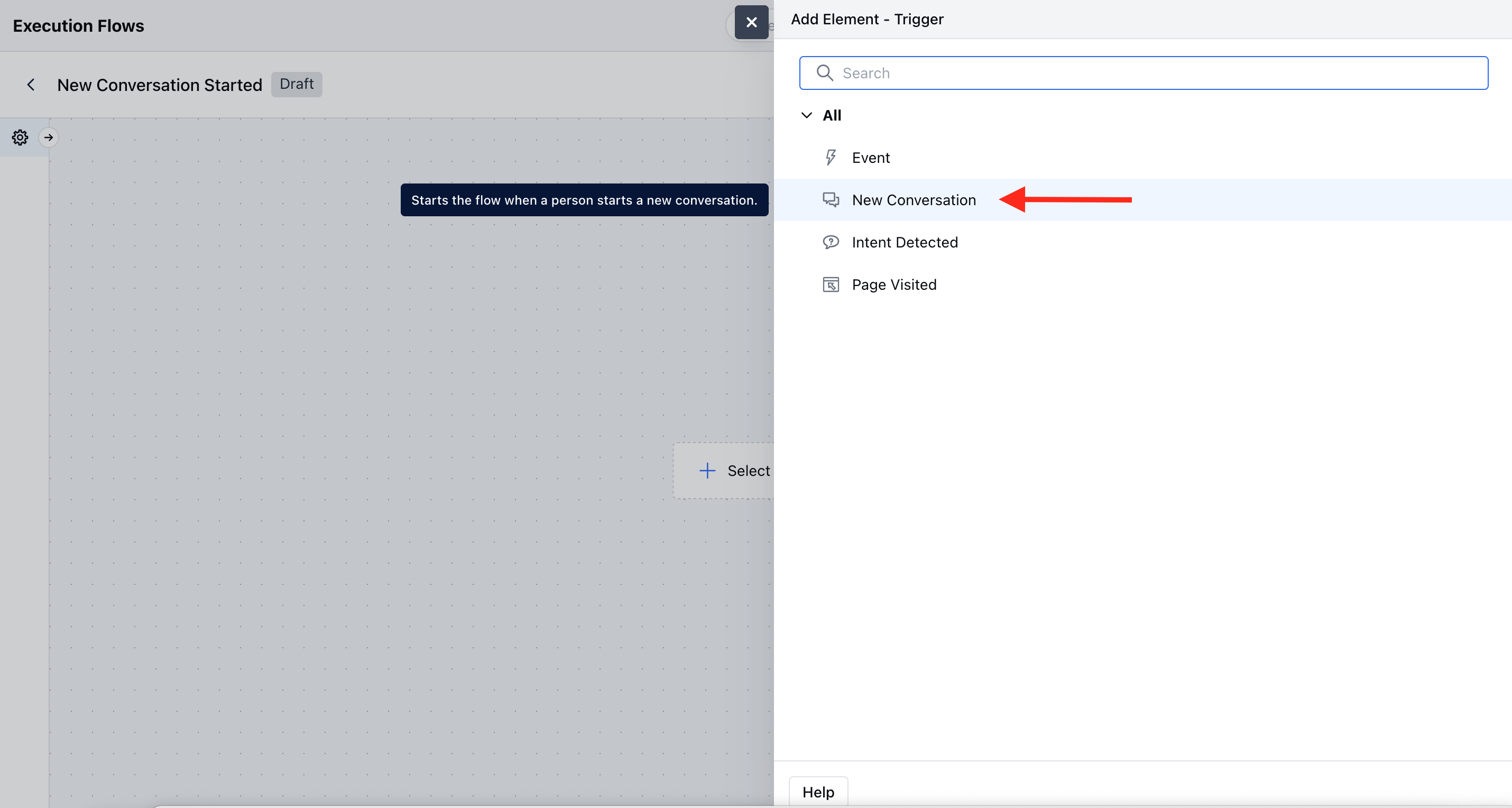 Fill in the configuration:-
* **Name:** Add a name for the trigger.
* **Description:** Add details to explain what the trigger does.
* **Channels:** Select at least one channel.
* **Web:** Triggers when a new chat starts from the Salesmate widget.
* [**Facebook:**](https://support.salesmate.io/hc/en-us/articles/25699791176857) Triggers when a new chat starts from Facebook.
* **WhatsApp:** Triggers when a new chat starts from WhatsApp.
### Practical Example
When a customer initiates a new chat via the **Skara Web Widget**, the **New Conversation** trigger activates an AI Pilot flow that:
* Greets the customer automatically.
* Collects basic information (like name, email, or issue type).
* Routes the conversation to the right team, such as **Sales** for pricing inquiries or **Support** for technical issues, based on user responses.
Fill in the configuration:-
* **Name:** Add a name for the trigger.
* **Description:** Add details to explain what the trigger does.
* **Channels:** Select at least one channel.
* **Web:** Triggers when a new chat starts from the Salesmate widget.
* [**Facebook:**](https://support.salesmate.io/hc/en-us/articles/25699791176857) Triggers when a new chat starts from Facebook.
* **WhatsApp:** Triggers when a new chat starts from WhatsApp.
### Practical Example
When a customer initiates a new chat via the **Skara Web Widget**, the **New Conversation** trigger activates an AI Pilot flow that:
* Greets the customer automatically.
* Collects basic information (like name, email, or issue type).
* Routes the conversation to the right team, such as **Sales** for pricing inquiries or **Support** for technical issues, based on user responses.
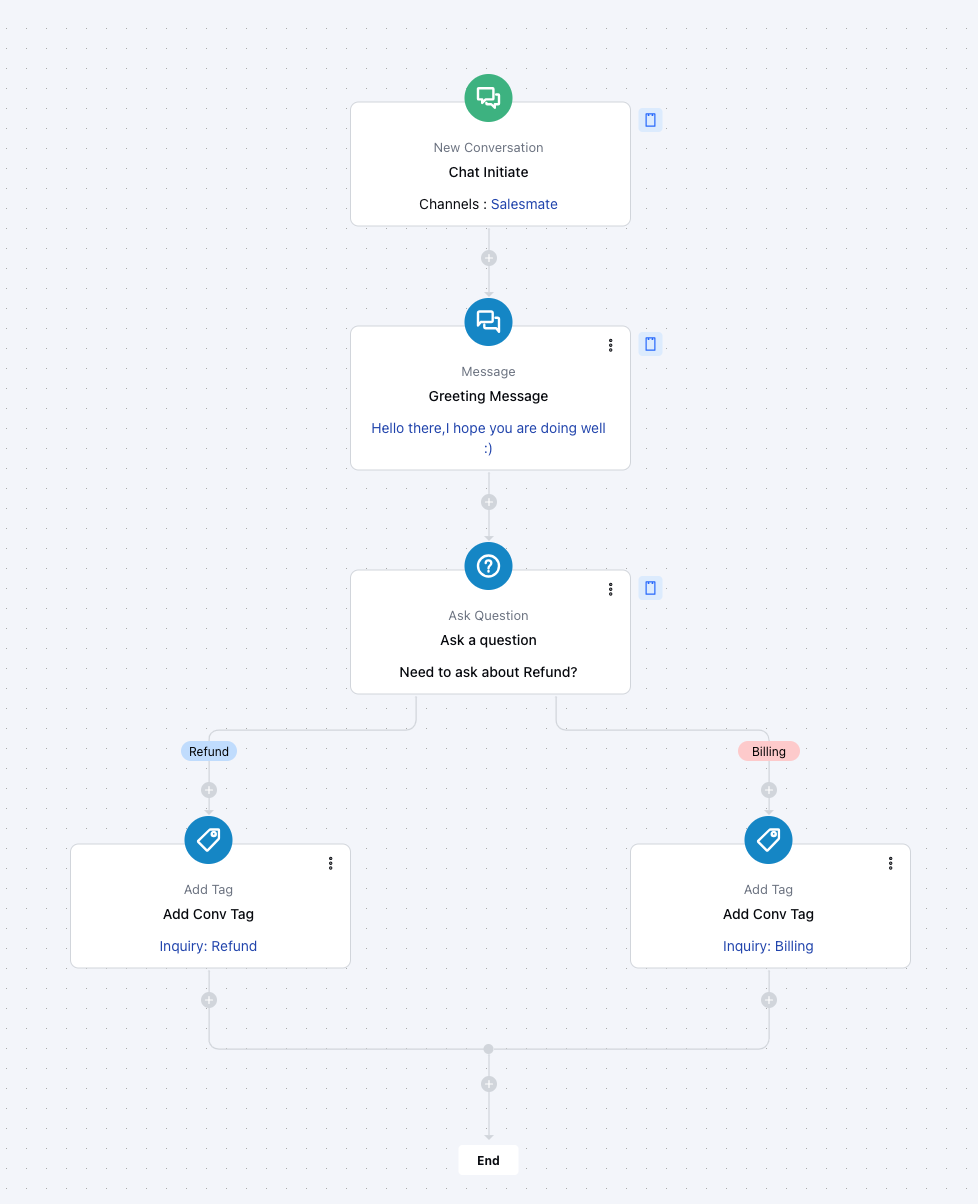 This ensures quicker response times, reduces manual triage, and delivers a personalized experience across channels like **Web**, **WhatsApp**, **Facebook**, or **Voice**.
**Note:**
* If a selected channel is not installed, you will see this message: \
"You need to install the app first to configure its triggers, conditions, or actions."
* If Unified Inbox is not active, this warning will appear: "You need to activate the Unified Conversation Inbox and connect this channel to configure the trigger."
* If no voice number is assigned to the AI Pilot, you’ll see: "You need to add at least one number to the Voice Channel associated with this AI Pilot to receive and handle the incoming calls."
This ensures quicker response times, reduces manual triage, and delivers a personalized experience across channels like **Web**, **WhatsApp**, **Facebook**, or **Voice**.
**Note:**
* If a selected channel is not installed, you will see this message: \
"You need to install the app first to configure its triggers, conditions, or actions."
* If Unified Inbox is not active, this warning will appear: "You need to activate the Unified Conversation Inbox and connect this channel to configure the trigger."
* If no voice number is assigned to the AI Pilot, you’ll see: "You need to add at least one number to the Voice Channel associated with this AI Pilot to receive and handle the incoming calls."