> ## Documentation Index
> Fetch the complete documentation index at: https://support.getskara.ai/llms.txt
> Use this file to discover all available pages before exploring further.
# How to Add New Contact/ Company Types inside Salesmate?
A "Contact Type" is a classification or categorization that helps organize and manage different kinds of contacts within the database.
**Note:** You will require to manage field rights to perform this action.
To add a New Contact Type:
* **Navigate to the** Profile Icon on the top right corner
* **Click on the** Set Up
* Head Over to the **Modules** Category
* **Select the** Module (Contact, Company)
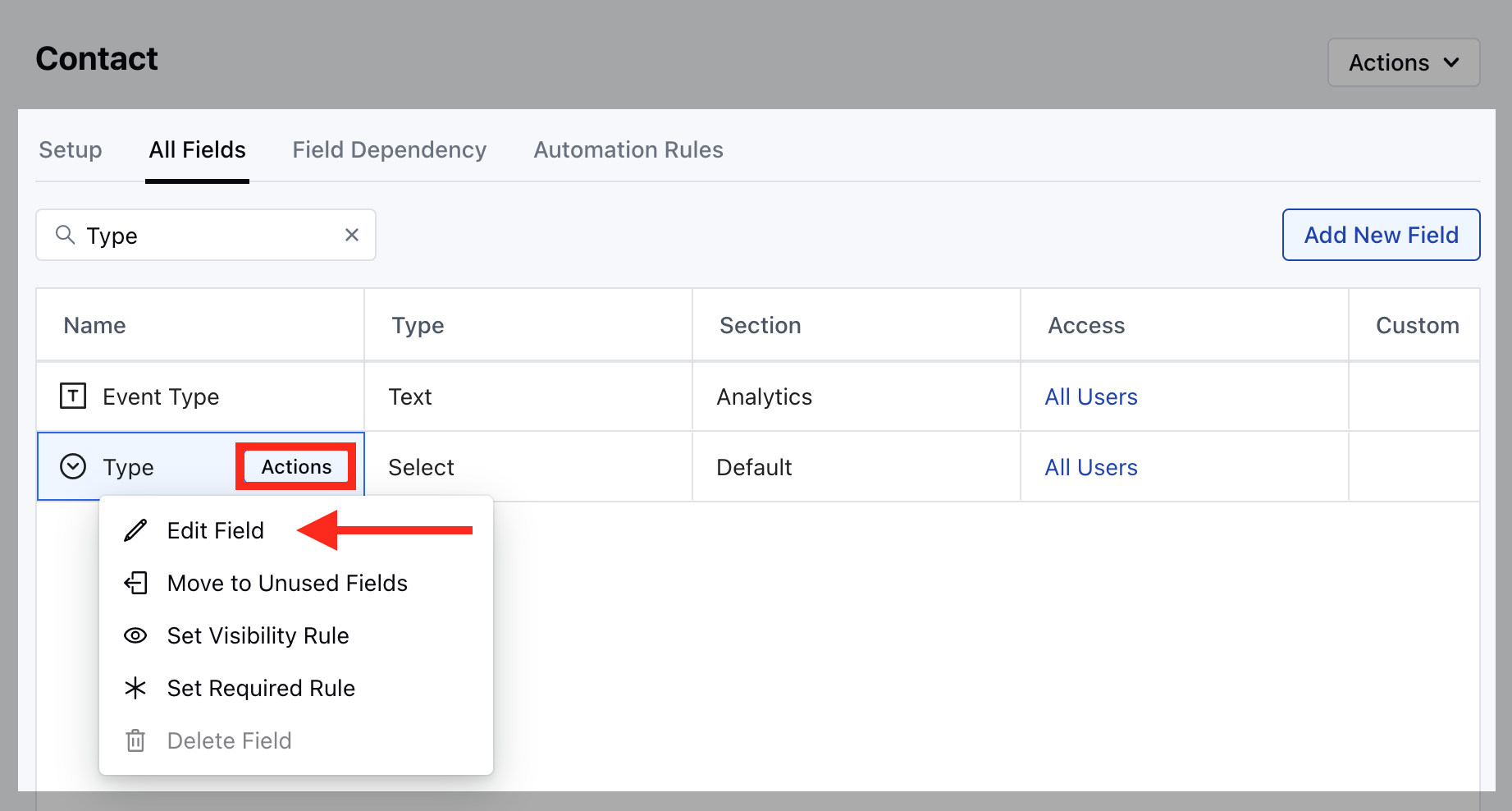 * **Go to the** All Detail Form Fields section
* **Search for** Type field and hover over it, Action button will appear
* **Click on the** Edit Field option
* **A pop up will open to** Add New Value , simple add the new Type here and hit on
* **Save**.
* **Go to the** All Detail Form Fields section
* **Search for** Type field and hover over it, Action button will appear
* **Click on the** Edit Field option
* **A pop up will open to** Add New Value , simple add the new Type here and hit on
* **Save**.