> ## Documentation Index
> Fetch the complete documentation index at: https://support.getskara.ai/llms.txt
> Use this file to discover all available pages before exploring further.
# Knowledge Base Articles Listing
The **Article Listing** screen provides a comprehensive view of all knowledge base articles created within your account. It supports multi-language management, robust filtering, bulk operations, and more.
**Note:** Only users with “**View Articles**” permission can access the article listing page.
### **Topics covered:**
* [Access Knowledge Base Articles](#access-the-knowledge-base-article-listing)
* [Actions on Articles](#actions-on-article)
* [Filters](#filters)
* [Bulk Operations](#bulk-operations)
* [Additional Operations](#additional-operations)
### Access the **Knowledge Base Article** Listing
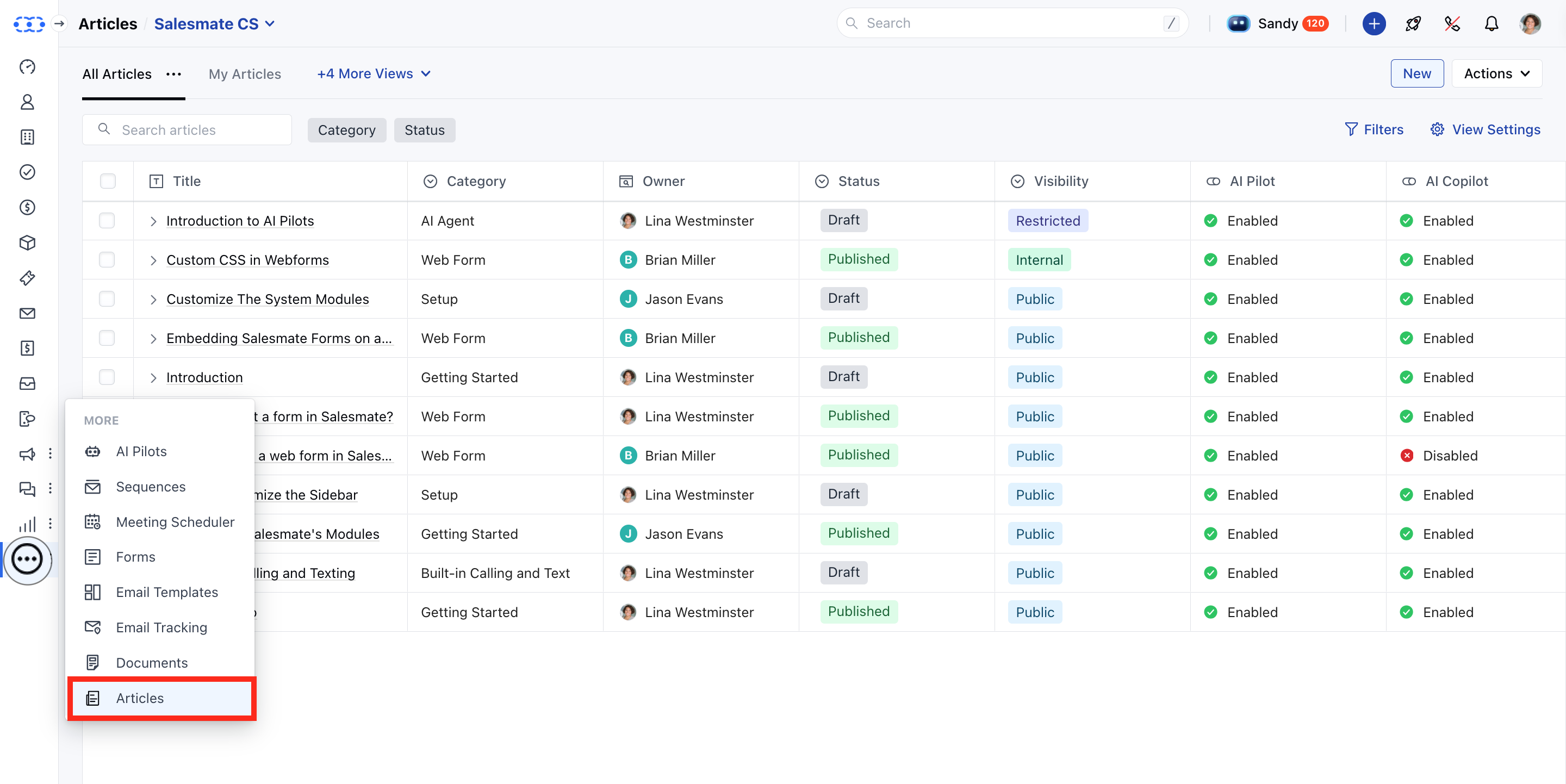
* **Access the** Articles feature from the left menu bar.
 * You will be redirected to the Article Listing screen.
You will see the list of columns with the following names:
* **Title:** The name of the article.
* **Category:** The selected category for the article.
* **Owner:** The user assigned as the article owner
* **Status:** Current article status: Draft, Published, or Archived.
* **Language:** The primary language in which the article is written.
* **Visibility:** Visibility level: Public, Internal, or Restricted (with rules).
* **AI Pilot:** Whether AI Pilot is enabled for this article.
* **AI Copilot:** Whether AI Copilot is enabled for internal assistance.
* **Last Modified By:** The last user who modified any part of the article.
* **Last Modified Date:** Timestamp of the most recent edit to the article.
* **Tags:** Tags to improve article discoverability.
### Actions on Article
* \*\*Edit \*\*: Open the article editor to update the article’s content or settings.
* \*\*Clone \*\*: Duplicate an article’s structure and content to create a new one quickly.
* **Version History:** Allows you to review and restore previous versions of the article.
* **Change Category:** Moves selected articles to a different category.
* **Archive:** Moves the article out of the active list without deleting it.
* \*\*Delete \*\*: Permanently remove the article from the knowledge base.
### Filters
On the article listing page, you have quick access to the **Category** and **Status** filters. For additional filtering options, click the **Filters** button to access more fields and narrow down your article search.
### Bulk Operations
* **Change Category:** Moves selected articles to a different category.
* **Change Owner:** Reassigns ownership of selected articles to another user.
* **AI Pilot:** You can enable or disable AI Pilots for selected articles.
* **AI Copilot:** You can enable or disable AI Copilots for selected articles.
* **Unpublish:** Unpublish the selected articles.
* **Delete:** Delete the selected articles.
Please refer to this [Bulk Operations on Knowledge Base Articles](https://support.salesmate.io/hc/en-us/articles/44524733757977-Bulk-Operations-On-Knowledge-Base-Articles) for more information.
### Additional Operations
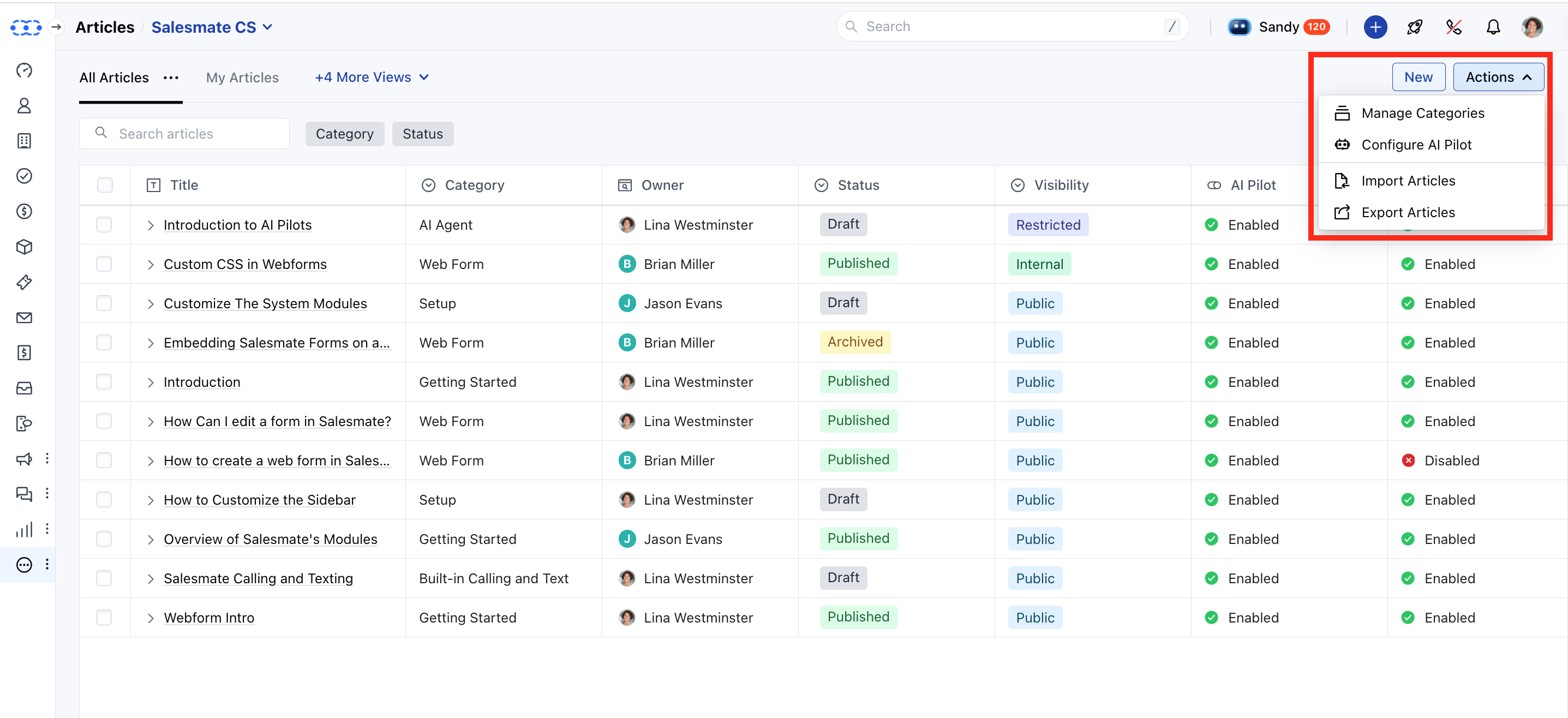
The **Actions** button on the article listing page provides access to the following operations:
* **Manage Categories:** Redirects to the *Organize Categories* screen under the Knowledge Base setup, allowing users to manage article categories.
* **Configure AI Pilot:** Opens the AI Pilot configuration screen, where the current Knowledge Base can be added for AI-driven assistance.
* **Import Articles:** Redirects to the import screen where articles can be uploaded via a CSV file.
* [Learn more](https://support.salesmate.io/hc/en-us/articles/44633577758873-Import-Articles-from-a-CSV)
* **Export Articles:** Enables downloading article data in bulk for backup or offline use.
* You will be redirected to the Article Listing screen.
You will see the list of columns with the following names:
* **Title:** The name of the article.
* **Category:** The selected category for the article.
* **Owner:** The user assigned as the article owner
* **Status:** Current article status: Draft, Published, or Archived.
* **Language:** The primary language in which the article is written.
* **Visibility:** Visibility level: Public, Internal, or Restricted (with rules).
* **AI Pilot:** Whether AI Pilot is enabled for this article.
* **AI Copilot:** Whether AI Copilot is enabled for internal assistance.
* **Last Modified By:** The last user who modified any part of the article.
* **Last Modified Date:** Timestamp of the most recent edit to the article.
* **Tags:** Tags to improve article discoverability.
### Actions on Article
* \*\*Edit \*\*: Open the article editor to update the article’s content or settings.
* \*\*Clone \*\*: Duplicate an article’s structure and content to create a new one quickly.
* **Version History:** Allows you to review and restore previous versions of the article.
* **Change Category:** Moves selected articles to a different category.
* **Archive:** Moves the article out of the active list without deleting it.
* \*\*Delete \*\*: Permanently remove the article from the knowledge base.
### Filters
On the article listing page, you have quick access to the **Category** and **Status** filters. For additional filtering options, click the **Filters** button to access more fields and narrow down your article search.
### Bulk Operations
* **Change Category:** Moves selected articles to a different category.
* **Change Owner:** Reassigns ownership of selected articles to another user.
* **AI Pilot:** You can enable or disable AI Pilots for selected articles.
* **AI Copilot:** You can enable or disable AI Copilots for selected articles.
* **Unpublish:** Unpublish the selected articles.
* **Delete:** Delete the selected articles.
Please refer to this [Bulk Operations on Knowledge Base Articles](https://support.salesmate.io/hc/en-us/articles/44524733757977-Bulk-Operations-On-Knowledge-Base-Articles) for more information.
### Additional Operations
The **Actions** button on the article listing page provides access to the following operations:
* **Manage Categories:** Redirects to the *Organize Categories* screen under the Knowledge Base setup, allowing users to manage article categories.
* **Configure AI Pilot:** Opens the AI Pilot configuration screen, where the current Knowledge Base can be added for AI-driven assistance.
* **Import Articles:** Redirects to the import screen where articles can be uploaded via a CSV file.
* [Learn more](https://support.salesmate.io/hc/en-us/articles/44633577758873-Import-Articles-from-a-CSV)
* **Export Articles:** Enables downloading article data in bulk for backup or offline use.