

Option one: Remove and reconnect your audio equipment (**headset/headphone, microphone, etc.
-
) to the system.Check the following link in your Chrome browser to see if you have granted access to your microphone, sound, USB device, or MIDI device (whichever is applicable). Sound and a microphone are required.)chrome://settings/content/siteDetails?site=https%3A%2F%2F demo.salesmate.io My Salesmate URL is ** demo.salesmate.io.*
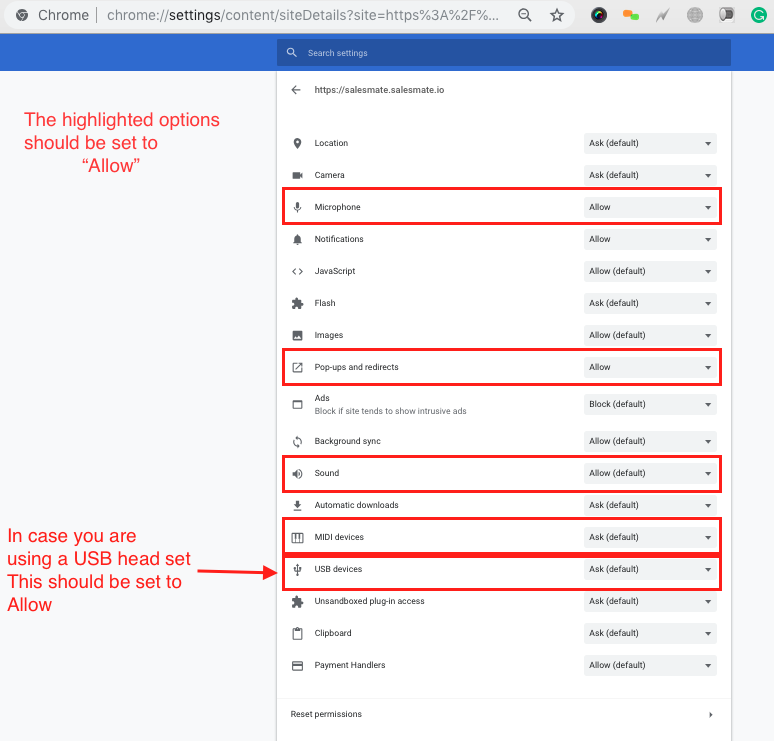
- *If allowed,refresh/reload (Ctrl/Command+Shift+R) the page and make a call.It should work 😃
Option two: If it is still not working,Navigate to the following address:**https://networktest.twilio.com/.
- ** This will check your call settings and, if necessary, authorise access to your microphone.If it is a PASS, refresh/reload the website (Ctrl/Command+Shift+R) and make a call.It should work 😃