

Can I edit an A2P Brand?
Yes. As of December 16, 2021, if your Brand registration attempt fails and Salesmate receives feedback from TCR about the failure reason, you can edit the Brand via the Salesmate and resubmit. Salesmate will cover the cost of retrying Brand registration for 2 additional attempts - a total value of $88. Note: The two additional attempts at no cost only apply to edits on the same Brand. Submitting a new Brand will result in a new charge.If there is an inaccuracy in an A2P Brand that you have already successfully registered, please contact the Salesmate support team be sure to include your Salesmate Account ID and exactly which details need to be corrected in your Brand registration.Can I delete an A2P Brand?
Yes, as of May 25, 2023, you can delete any of your existing Brands, whether they are in a Failed or Registered state. Please note that if this is a registered Brand then any Campaign Use Cases associated with it must be deleted first before you can delete the Brand. Deletion of both Campaign Use Cases and Brands is permanent and cannot be undone, please proceed with caution. Navigate to the Profile Icon on the top right cornerClick on Setup Head over to Voice & Text categoryClick on Voice Apps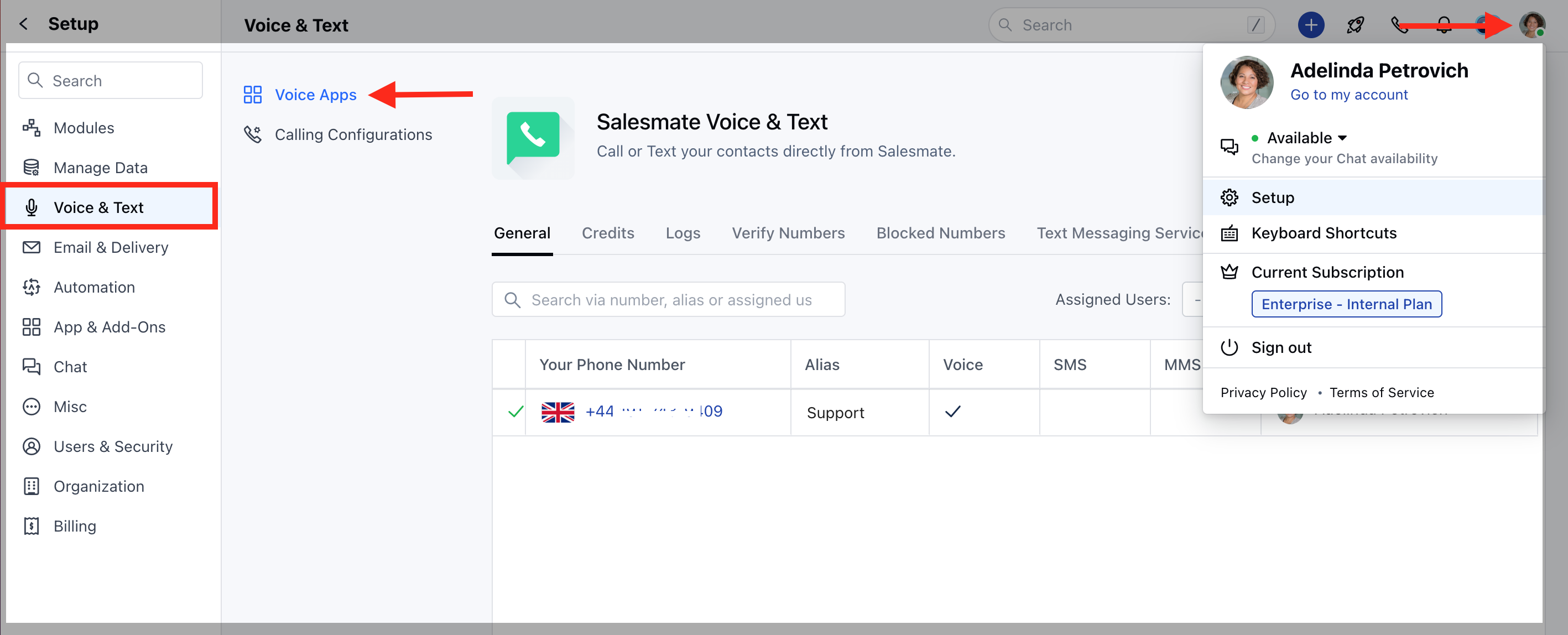
Can I edit or delete an A2P Campaign Use Case?
It is not possible to edit an already-registered, in-progress, or failed A2P Campaign; however, you may delete (unregister) an A2P Campaign via the Console or API, and register a new one in its place.A2P Campaigns can be deleted (unregistered) via Salesmate regulatory compliance: Navigate to the Profile Icon on the top right cornerClick on Setup Head over to Voice & Text categoryClick on Voice Apps- Yes to remove. This will delete it completely from Salesmate and TCR, and cannot be undone.