

Topics covered:
- Business Type
- Template Type
- Use Case
- Key Features of the Flow
- Steps used in Creating the Flow
- Benefits
Business Type
Ideal for SaaS,B2B, and service companies that prioritize maintaining a healthy sales pipeline and boosting engagement.Template Type
Designed for Campaigns and Follow-Up Automation, this flow streamlines deal management and engagement.Use Case
Perfect for deal re-engagement, sales pipeline optimization, and proactive management of inactive deals.Key Features of the Flow
- Automated Deal Monitoring: Detects deals inactive for 30+ days to prevent stagnation.
- Internal Notifications: Notifies the deal owner about inactive deals to prompt action.
- Task Assignment: Creates follow-up tasks for re-engagement, ensuring no deal is overlooked.
- Sales Pipeline Health: Improves pipeline management and maintains consistent deal progress.
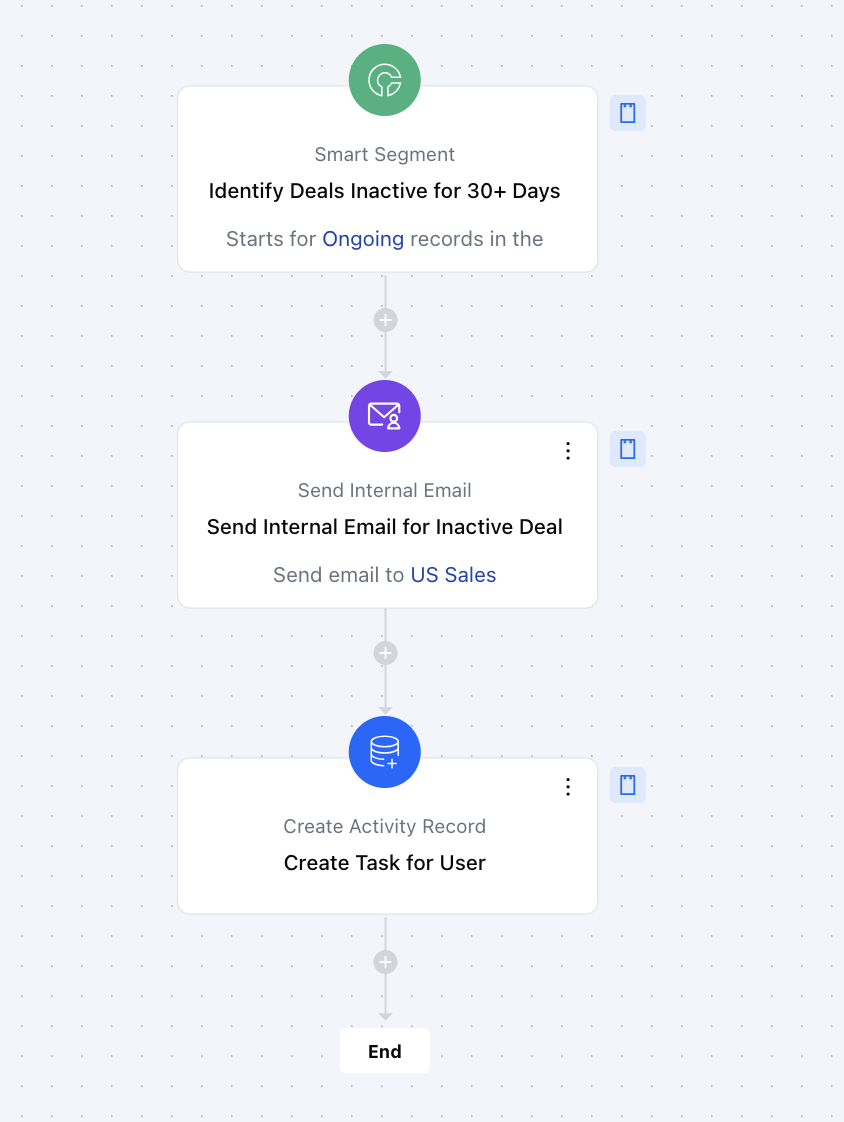
Breakup of Items Used in the Flow** Trigger Smart Segment: The flow activates automatically when a deal has been inactive for over 30 days, ensuring no stagnant opportunity is overlooked.
- Actions- Send Internal Email: Sends an email to the assigned deal owner, notifying them about the inactive deal and prompting action.
- Create Activity: Automatically generates a task in the CRM for the deal owner to re-engage with the prospect and move the deal forward.
- End The flow concludes when the assigned follow-up task is completed, and the deal is successfully re-engaged or moved to the next stage.
Steps to Create Get Notification on Rotten Deals Flow
You can click here to learn how to create a new Smart Flow or access the Flow Templates.- Trigger:Smart Segment**- Description: Detects deals with no activity for 30+ days to prevent stagnation
- Use Case: Helps sales teams identify inactive deals early and take timely action.
- Action:Send Internal Email Notification:**- Description: Sends an automated email to the deal owner, alerting them about an inactive deal.
- Use Case: Helps sales teams stay proactive by prompting immediate follow-up action Create an Activity :- Description: Automatically generates a follow-up task in the CRM for the deal owner.
- Use Case: Ensures timely re-engagement with prospects and prevents deals from being overlooked.
Benefits
- Proactive Deal Management: Automates the detection of stagnant deals, ensuring no opportunity is missed.
- Improved Conversion Rates: Timely follow-ups boost engagement and increase the likelihood of closing deals.
- Efficiency through Automation: Reduces manual effort, allowing sales teams to focus on meaningful tasks while automating deal monitoring and follow-ups.
- Ideal for B2B, SaaS, and Service Companies: Particularly beneficial for industries with long sales cycles, where consistent engagement is essential to prevent deals from going dormant.