

Topics covered:
- Business Type
- Template Type
- Use Case
- Key Features of the Flow
- Steps used in creating the flow
- Breakup of Items used in the Flow
- Benefits
Business Type Perfect for SaaS,B2B, and E-Commerce businesses aiming to streamline their sales and client engagement processes.
Template Type Ideal for Campaigns,Reports, and Dashboards, this template is designed to simplify follow-ups and boost conversions.
Use Case This template helps sales teams manage leads effectively by automating client engagement after quoting, ensuring opportunities are not missed.
** Key Features of the Flow Automated Follow-Ups: Keeps client engagement active with automatic follow-up actions after a quote is sent.
- Call Scheduling: Schedules client calls to maintain timely communication.
- ** Email Automation **: Sends personalized follow-up emails based on client interactions, saving time and adding a personal touch.
Steps used in creating the flow You can click here to learn how to create a new Smart Flow or access the Flow Templates.
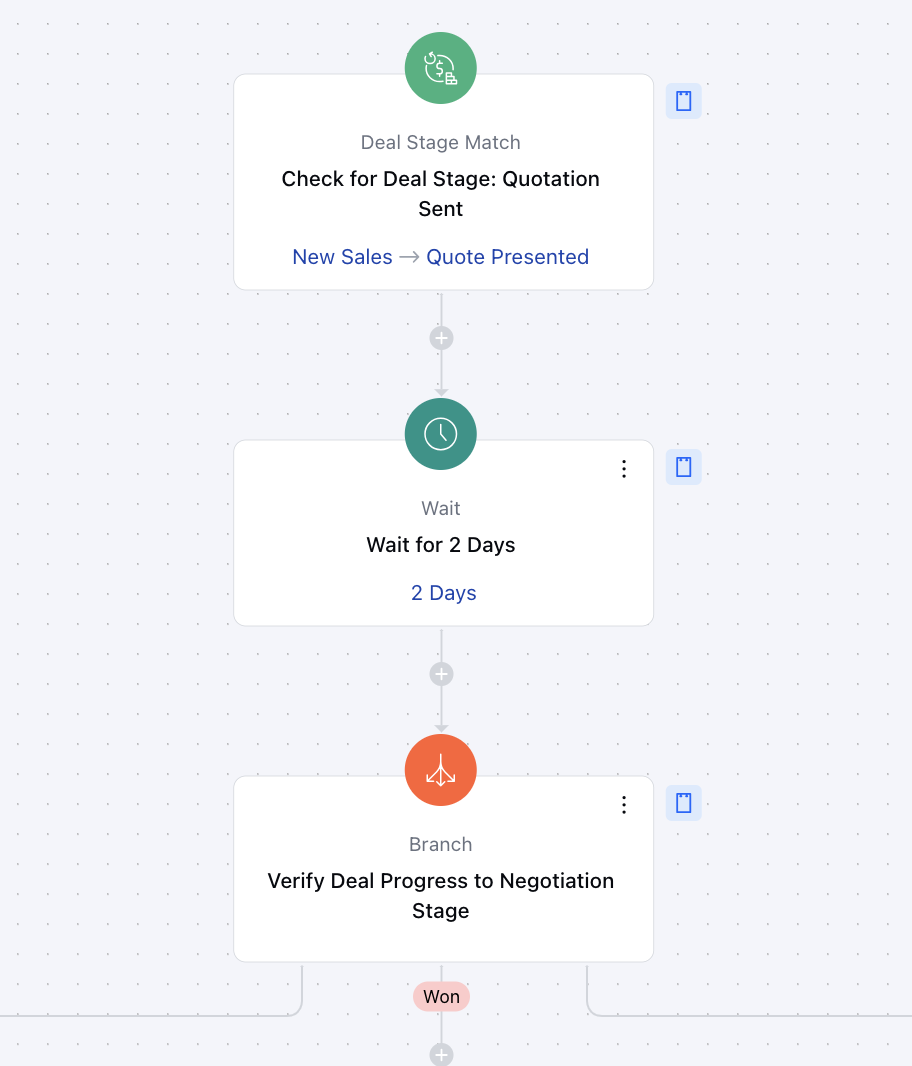
- Trigger:Deal Stage Match**- Description: Triggers follow-up actions when a deal reaches the “Quotation Sent” stage.
- Use Case: Ensures timely engagement, helping move deals forward efficiently.
- Interactions: Wait:- Description: Adds a 2-day wait after “Quotation Sent” to give the client time to review the proposal.
- Use Case: Ensures thoughtful follow-ups without overwhelming the client.Branch:- Description: Checks if the deal has progressed to the “Negotiation” stage and identifies the necessary actions to move forward.
- Use Case: Ensures sales teams take the right steps in negotiating terms, improving deal closure rates.
-
- Actions *Create Activity Record (Option 1):- Description: initiates a follow-up call to review the quote with the client, addressing any questions or concerns.
- Use Case: Ensures clients fully understand the quote and clarifies any doubts, improving the chances of closing the deal.
- Exit (Option 2):- Description: Ends the flow for deals that have been successfully closed and marked as won.
- Use Case: Streamlines the sales process by closing out deals that are finalized, reducing unnecessary follow-up actions.
- Create Activity Record (Option 3):- Description: The sales team reviews the deal’s parameters to determine if it’s ready to move into the negotiation stage.
- Use Case: Helps evaluate the readiness of a deal to move forward, ensuring proper preparation before entering negotiations.

** Breakup of Items Used in the Flow **Trigger **Deal Stage Match **: Initiates the flow when a deal reaches the “Quotation Sent” stage, ensuring timely follow-ups.
- ** Condition Branch: Splits the flow into different paths depending on whether the client responds, advances to negotiation, or the deal is closed.
- **Actions **Create Activity Record **: Generates tasks for follow-up calls or deal reviews to ensure timely action.
- ** Exit **: Ends the flow for deals that are successfully closed and marked as won.
- ** End** The flow concludes once the necessary follow-up actions are completed.
** Benefits Efficiency: Reduces manual work by automating repetitive follow-up tasks.
- Enhanced Engagement: Maintains consistent and meaningful communication with clients.
- ** Increased Conversion **: Keeps clients engaged and moves them forward in the sales pipeline, boosting the likelihood of closing deals