

Topics covered:
- Business Type
- Template Type
- Use Case
- Key Features of the Flow
- Breakup of Items Used in the Flow
- Steps used in Creating the flow
- Benefits
Business Type Ideal for SaaS,B2B, and Service Companies, this flow is especially useful for industries with long sales cycles requiring consistent follow-ups to prevent deals from going cold.
Template Type Designed for Campaigns and Follow-Up Automation, this flow automates repetitive follow-up tasks and keeps your sales pipeline active and efficient.
Use Case Perfect for Deal Re-Engagement and Deal flow management, this template helps sales teams re-engage with prospects, improve deal progression, and maintain consistent communication with inactive deals.
** Key Features of the Flow Automatic Detection of Inactive Deals: Scans for deals with no activity for over 30 days, flagging them for re-engagement.
- Automated Re-Engagement: Sends personalized emails to prospects, reigniting interest in dormant deals.
- ** Follow-Up Task Creation **: Assigns tasks to deal owners, ensuring timely follow-up actions.
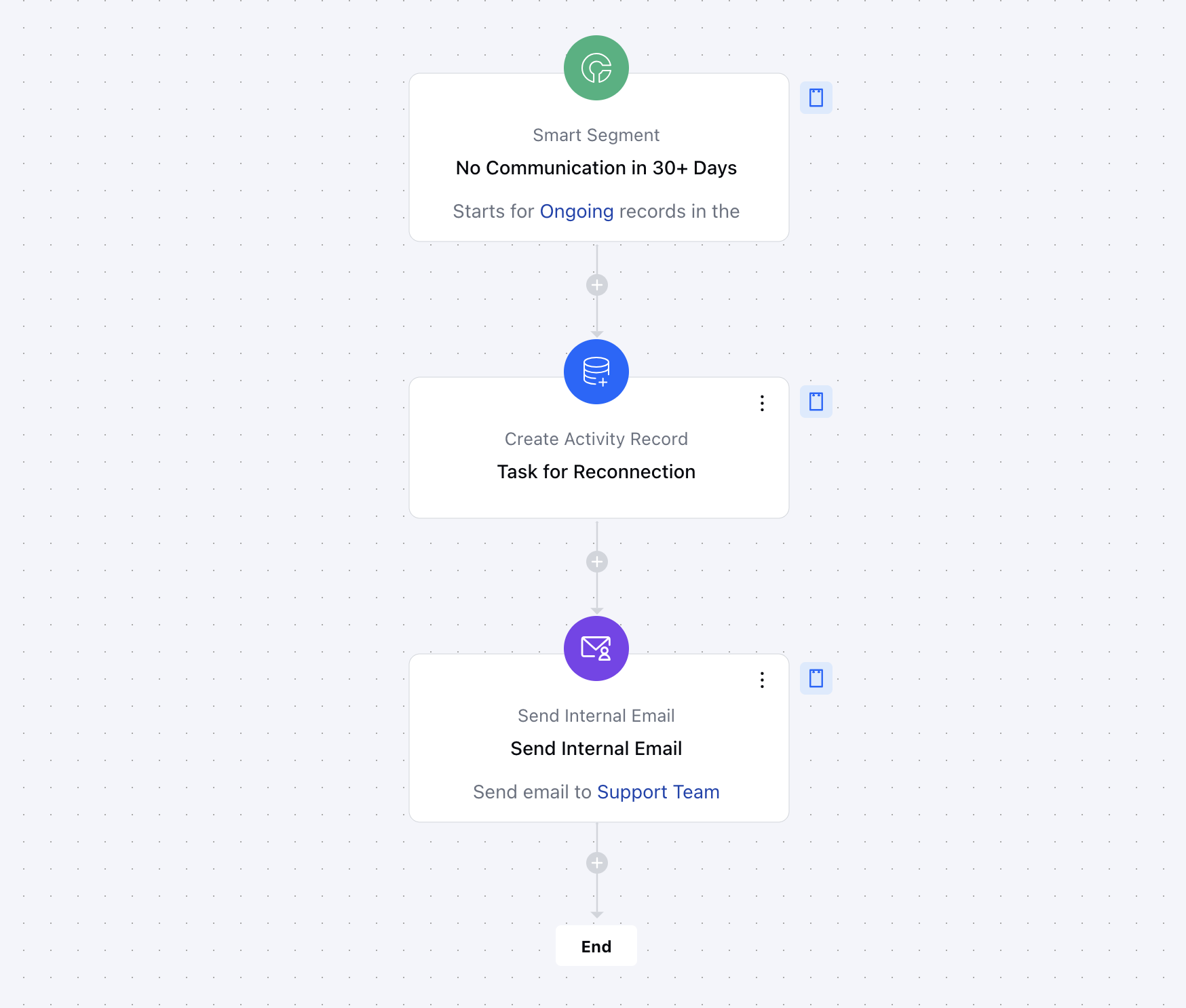
** Breakup of items used in the flow **Trigger **Smart Segment **: It identifies deals with no activity for 30+ days.
- ** Actions Create Activity Record: Generates a follow-up task for the deal owner, ensuring accountability and proactive engagement.
- Send Internal Email: Notifies the deal owner about the inactive deal, ensuring they are informed and can act promptly.
- ** End** The flow ends after the follow-up actions are completed, ensuring the deal is addressed appropriately.
Steps used in creating the flow You can click here to learn how to create a new Smart Flow or access the Flow Templates.
- Trigger:Smart Segment- Description: This trigger activates when a deal’s last communication date exceeds 30 days, signaling inactivity.
- Use Case: It ensures that follow-up actions are automatically initiated, preventing the deal from stalling and helping to re-engage the prospect before it goes cold.
- Action:
- Use Case: Keeps the sales team on track by reminding them to follow up with prospects, ensuring timely engagement and progress on the deal.[
- Send Flow Email: ](https://support.salesmate.io/hc/en-us/articles/38138164432409-Send-Flow-Email)
- Description: Sends an internal email notification to the assigned record owner and relevant team members about the inactive deal, providing key details.
- Use Case: Ensures the team is informed about inactive deals, prompting them to take swift action to revive the deal and prevent it from being forgotten.
Benefits This flow automates routine tasks, reduces manual tracking, and ensures consistent prospect engagement. Key benefits include:Proactive Deal Management: Prevents deals from slipping through the cracks.
- Improved Conversion Rates: Encourages timely follow-ups, increasing the chances of closing deals.
- Automation Efficiency: Saves time by reducing manual effort, allowing sales teams to focus on high-priority tasks.