

- Business Type
- Template Type
- Use Case
- Key Features of the Flow
- Steps Used in Creating the Flow
- Breakup of Items Used in the Flow
- Benefits
Business Type
This works best for businesses that rely on regular renewals, like B2B services or subscription-based companies.Template Type
Designed for teams focused on customer retention and renewals. It automatically reminds clients about upcoming deadlines and adjusts follow-ups based on their responses.Use Case
This flow tracks clients with approaching renewal dates, sends automated text reminders, and handles follow-ups. If clients renew, the process ends; if they don’t respond, it keeps nudging them until the deadline.Key Features of the Flow
- On-Time Reminders: Sends text messages to clients about their upcoming renewals.
- Better Engagement: Keeps customers in the loop, reducing missed renewals.
- Boosted Retention: Encourages timely renewals to minimize revenue loss.
Detailed Steps of the Flow
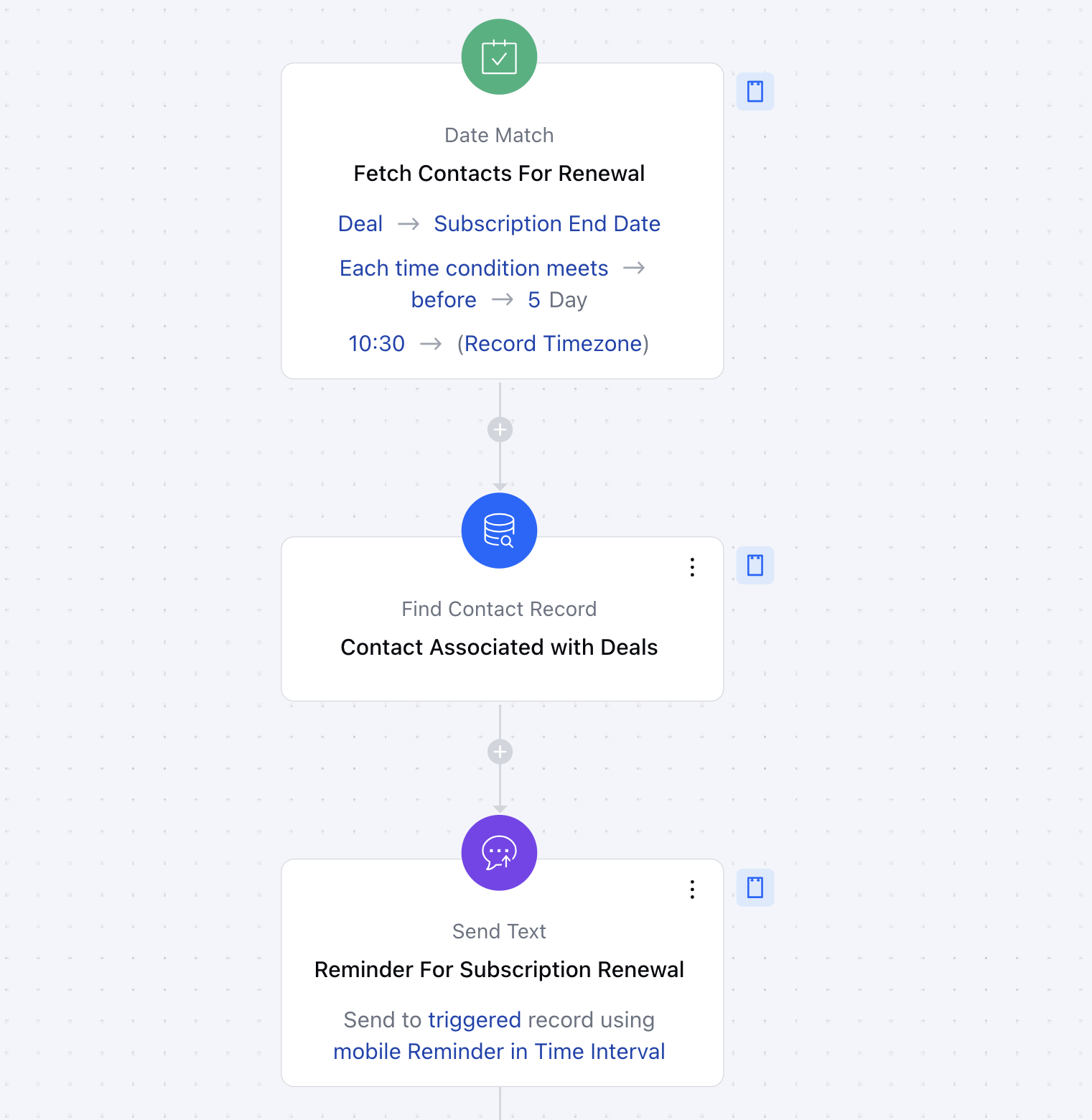
You can click here to learn how to create a new Smart Flow or access the Flow Templates.- **Trigger: Date MatchDescription: The flow begins with a date/time trigger, identifying records with a subscription end date exactly 5 days from today.
- Practical Use Case: Ensures only relevant records are targeted for renewal reminders.
- **Find the relevant records: Find Records**Description **: Searches the database to locate client records that match the criteria defined by the trigger.
- ** Practical Use Case **: Focuses reminders on clients with active subscriptions nearing expiration.
- ** Send Texts to contacts: Send TextDescription: Sends a personalized text message to clients, informing them of their upcoming renewal deadline.
- ** Practical Use Case **: Encourages timely client action to avoid service interruptions
-
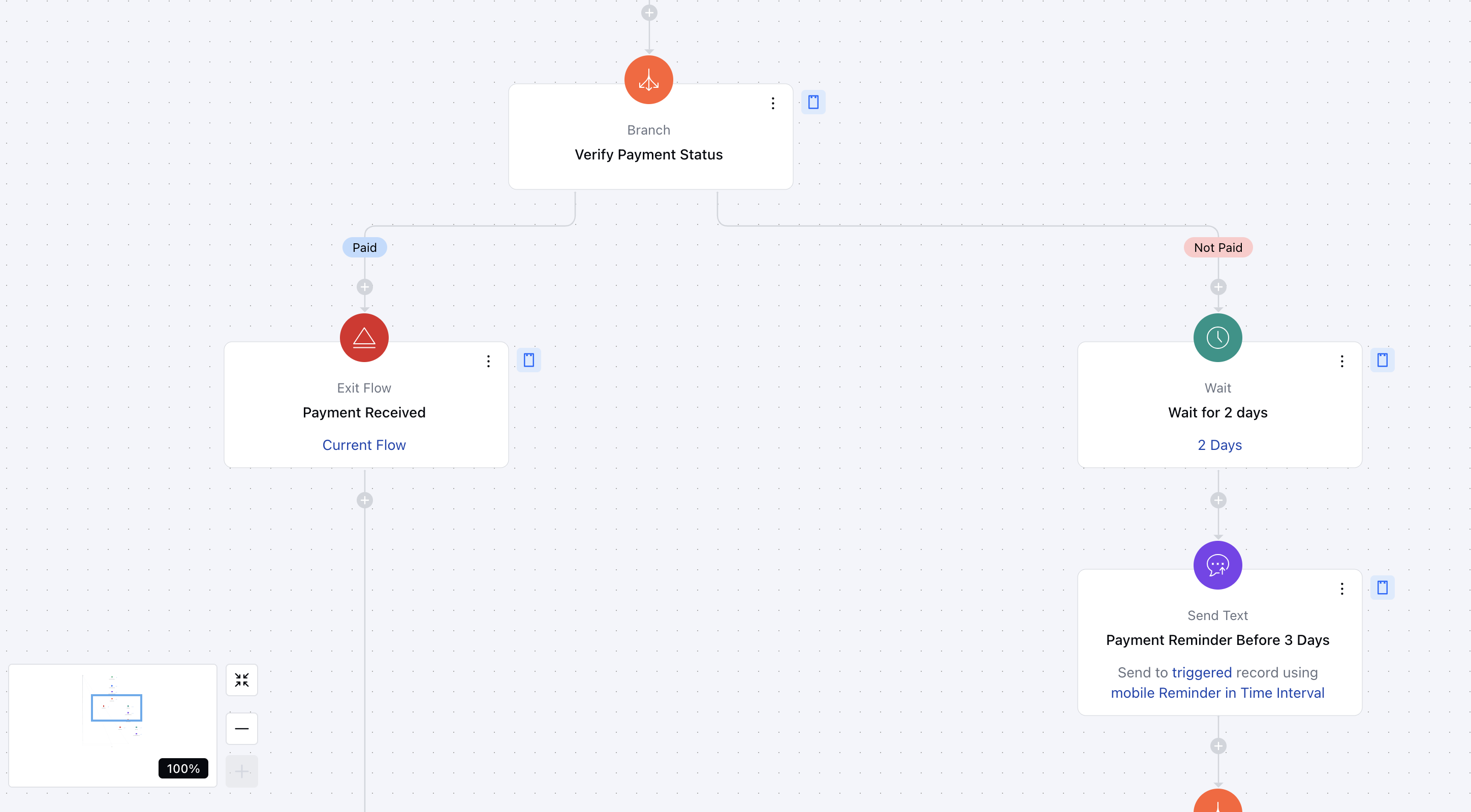
- Branching Based on Conditions: Branch*Description: Splits the flow into different paths based on conditions like whether the renewal has been completed.
- Practical Use Case: Ensures only necessary follow-ups are sent to clients who haven’t yet renewed.
- **Wait for a certain time period: Wait**Description **: Introduces a pause to align reminder messages with the ideal time for client engagement.
- ** Practical Use Case **: Ensures reminders are sent at strategic intervals.
- ** Exit the Flow: Exit Flow**Description **: Ends the flow for records where the renewal has been completed or further follow-ups are unnecessary.
Breakup of Items Used in the Flow **Trigger (1)**Identifies records with a subscription end date 5 days from today, initiating the flow.
- **Find Records (1)**Searches the database to locate relevant client records.
- **Exit Flow (2)**Removes records from the flow when renewal is completed or no further action is required.
- **Send Text (3)**Sends personalized renewal reminders to clients via text messages.
- **Wait (2)**Pauses the flow to ensure reminders are sent at the right time.
- **Branching (2)**Splits the flow into paths based on payment status.
Benefits
- Efficiency: Reduces manual effort in managing renewal reminders.
- Customer Engagement: Keeps clients informed and improves their experience with timely communication.
- Revenue Assurance: Helps maintain consistent revenue by reducing missed renewals.